Showing posts with label windsor. Show all posts

Thursday, October 9, 2014

Toggling With Windsor

Preface

There are a number of times when we've all had to implement new features or modify the implementation of an existing code base. An intern recently asked me how to feature toggle something using Castle.Windsor. This post will show how to use some Castle.Windsor features to toggle implementations. The example code can be found on GitHub.

Primitive Dependencies

The toggle will be an app setting in the application's config file. It will be loaded by Castle.Windsor by using a custom dependency resolver. This resolver is taken from Mark Seeman's post on AppSettings.

The Service

We'll be using a simple interface as our service definition. There will be two implementations. One represents an old implementation, the other a new.


It's useful to note that this is a common way to achieve some branching by abstraction. This is done by replacing calls to a service with an interface. This interface is the abstraction. Once the calls to the old service are replaced, you are free to implement a new service. When ready, the new service can be substituted for the old without the consumers being aware since they depend on the interface not the concrete.

Typed Factory Selector

Castle.Windsor comes with a handy little bit: the typed factory facility. The typed factory facility lets Castle.Windsor create a factory implementation from an interface defined by you. This relieves you of the task of implementing the factory on your own. It is especially useful if you want to defer the creation of the object.


Our class will use this factory to get an instance of our service, and call the .Print() method. The default for this object will be the first one registered in the container. This behavior can be overridden by implementing a custom selector.


The typed factory and selector must both be registered with the container. The selector must also be specified in the configuration of the typed factory. This is done on lines 21 and 22 of the ContainerFactory class.


Using IHandlerSelector

Mike Hadlow provides a very good example of using a custom IHandlerSelector.

We can use a similar technique to pull in a config value and supply the appropriate implementation at run time. The custom IHandlerSelector uses the config value to select the appropriate handler. If no handlers are found it throws an exception. This handler is then returned.


This service handler must be registered and added to the container's kernel. Line 19 of the ContainerFactory class show the registration. Line 26 shows the selector being added to the kernel. While there is only one selector in this example, the snippet shows how to add more than one.

Running the Console

Changing the config value and running the console app shows that the selectors are functioning correctly.


Wrapping It Up

Feature toggles and branching by abstraction are powerful ways to control whether new code is being used in production. They provide a way to replace old behavior with new, while maintaining the integrity of the product's build. Hopefully these two examples will help you integrate feature toggling into your builds.

Monday, March 11, 2013

Building a Service App: Logging

Preface

In the last post, we saw how to get started hooking things up with Windsor, TopShelf, and NLog. This post will take a look at logging with Windsor and NLog. We'll also look at using a utility called Log2Console to view our log messages as they are generated.

The Packages

This post looks at using the following NuGet packages:
Installing Castle.Windsor-NLog ensures that all the appropriate logging dependencies are included in our application. NLog.Schema adds some Intellisense to help with the NLog.config file.

Initializing the Logger

Windsor's behavior can be extended through the use of facilities. A handy one, available out of the box, is the Logging Facility. We'll be setting up to use NLog as our framework. Windsor is configured to use NLog by adding the appropriate facility:

            container.AddFacility<LoggingFacility>(facility => facility.LogUsing(LoggerImplementation.NLog))

It is possible to specify various options: config file location, log target, etc. We'll be using the default NLog beahvior which looks for a file called NLog.config in the root directory of the assembly.

Configuring the Logger

Adding the NLog.Schema package to a project adds a schema file which can aid in editing the NLog.config file. The NLog wiki is pretty good about documenting the different options. In short, the config is broken into two sections:

  1. Targets. These describe the formatting, content, and destination of the log message.
  2. Rules. These describe what gets logged, and to what target the message is sent.
Viewing Logger Messages

A nifty trick which can be used while you're working on things is to use NLog in conjunction with a utility called Log2Console. To use Log2Console to view log message, you will need to add a receiver. This will allow it to receive messages. First click the Receivers button, then click the Add... button. Add a UDP receiver, leaving the default settings.

The receivers dialog box with a UDP receiver added.

After adding the receiver, the NLog.config file will need to be updated. A Chainsaw target will need to be added. There will also need to be the corresponding rule created:

A snapshot of an NLog.config file highlighting the chainsaw config options.


Once it's setup, Log2Console should catch the messages sent to NLog by your application.

An example of log output in Log2Console.


Conclusion

This showed a quick and dirty way of viewing log messages in real time. It's something that could be useful while working on applications. Next up will be a look at setting up WCF endpoint in our TopShelf app.

Thursday, March 7, 2013

Building a Service App: Adding Windsor and TopShelf

Preface

In the last post we started with a basic exception handling clause in our console application. This time, we'll be dropping in TopShelf, Windsor, and some Logging bits. The example code is available on GitHub.

The Service Class

The service class will be very simple to start. All it will do is write a couple messages to our logger:

    public interface IExampleService
    {
        void Start();
        void Stop();
    }

    public class ExampleService : IExampleService
    {
        private readonly ILogger logger;

        public ExampleService(ILogger logger)
        {
            this.logger = logger;
        }

        public void Start()
        {
            logger.Debug("The service was started.");
        }

        public void Stop()
        {
            logger.Debug("The service was stopped.");
        }
    }

To make this class available elsewhere, we'll need to register it with our IoC container, Windsor. There are a lot of different ways to register components. This time, we'll use an installer. Installers are a convenient way to segregate the registration of your application's components.

    public class MyInstaller : IWindsorInstaller
    {
        public void Install(IWindsorContainer container, IConfigurationStore store)
        {
            container.Register(
                Component.For<IExampleService>().ImplementedBy<ExampleService>()
                );
        }
    }


We'll need to add other components to this as things go along. But for now, it's a good start.

Updating Program.Main()

Now that we have a service class and an installer we can modify the Program.Main() method.

        static void Main()
        {
            try
            {
                var container = ContainerFactory();

                RunTheHostFactory(container);
            }
            catch (Exception exception)
            {
                var assemblyName = typeof(Program).AssemblyQualifiedName;

                if (!EventLog.SourceExists(assemblyName))
                    EventLog.CreateEventSource(assemblyName, "Application");

                var log = new EventLog { Source = assemblyName };
                log.WriteEntry(string.Format("{0}", exception), EventLogEntryType.Error);
            }
        }

The ContainerFactory() method creates a new instance of the container. It then configures the container with the appropriate services.

        private static IWindsorContainer ContainerFactory()
        {
            var container = new WindsorContainer()
                .Install(Configuration.FromAppConfig())
                .Install(FromAssembly.This());
            return container;
        }

The next method, RunTheHostFactory(), covers the bulk of the TopShelf implementation. It uses the TopShelf HostFactory static class to perform the actual work.


        private static void RunTheHostFactory(IWindsorContainer container)
        {
            HostFactory.Run(config =>
                {
                    config.Service<IExampleService>(settings =>
                        {
                            // use this to instantiate the service
                            settings.ConstructUsing(hostSettings => container.Resolve<IExampleService>());
                            settings.WhenStarted(service => service.Start());
                            settings.WhenStopped(service =>
                                {
                                    // stop and release the service, then dispose the container.
                                    service.Stop();
                                    container.Release(service);
                                    container.Dispose();
                                });
                        });

                    config.RunAsLocalSystem();

                    config.SetDescription("This is an example service.");
                    config.SetDisplayName("My Example Service");
                    config.SetServiceName("MyExampleService");
                });
        }

TopShelf's HostFactory use our container to instantiate our service. It also cleans up when the service is stopped. This is the basic TopShelf implementation. Calls to .WhenPaused(), and .WhenContinued() can be added to the HostFactory to handle when the service is paused and resumed in the service control panel.

First Run

At this point it's possible to build and install our service. A handy thing about TopShelf is that it greatly simplifies using generic services. Running our service from the Visual Studio debugger shows us we have some basic functionality (red tic marks indicate the logger entries made by the service class):

The console app being run in the debugger.

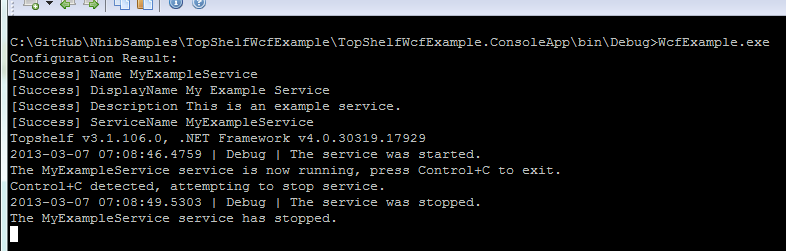
There are some other basic things we can do with a TopShelf-based application. We can run the executable as any other console app can be run:

TopShelf app being run as a console app.

Installing the service is pretty done by adding a parameter, install, to the command:

Output of the WcfExample.exe install command.

Once a service is installed, it can be started and stopped:

Example of the WcfExample.exe start command.

Example of the WcfExample.exe stop command.

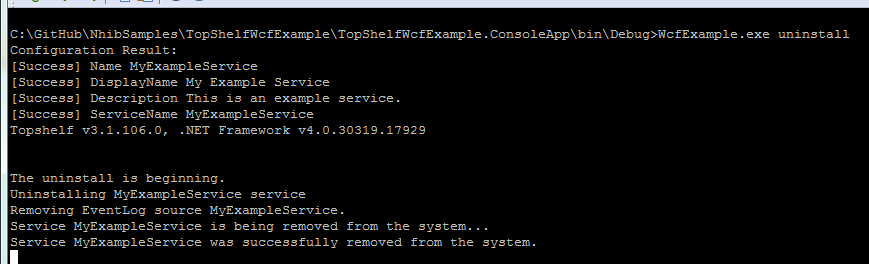
Finally, the service may be uninstalled:

Example of the WcfExample.exe uninstall command.

Conclusion

We covered how to get started with TopShelf. We also looked at setting up an IoC to work with a TopShelf-based application. Next we'll look a little more at logging, and how we can use a component to configure our service.

Tuesday, April 24, 2012

IoC: Windsor TypedFactoryFacility and Generics

Preface

Castle.Windsor is a powerful IoC framework. Since being cajoled into using it by a co-worker, I've come to really like it's features. Today I'm making a brain dump of something cool the TypedFactoryFacility can do. For those that don't know, this facility provides, "... automatically generated abstract factories..."

The Problem

I was creating a service host which exposed a few endpoints. These in turn called the business specific functionality. The service class already had four or five business specific methods on it. That's a lot of dependencies to put in a constructor.

    public class DrinkServiceWithoutFactory : IDrinkService
    {
        private readonly Fridge fridge;
        private readonly Machine machine;

        public DrinkServiceWithoutFactory(Fridge fridge, Machine machine)
        {
            this.fridge = fridge;
            this.machine = machine;
        }

        public IList<Can> GetCans()
        {
            return fridge.Dispense();
        }

        public IList<Bottle> GetBottles()
        {
            return machine.Dispense();
        }
    }

    public class Fridge : IDispenser<Can>
    {
        public IList<Can> Dispense()
        {
            Console.WriteLine("Creating 1 Can...");

            return new List<Can>
                   {
                       default(Can)
                   };
        }
    }

    public class Machine : IDispenser<Bottle>
    {
        public IList<Bottle> Dispense()
        {
            Console.WriteLine("Creating 2 bottles...");

            return new List<Bottle>
                   {
                       default(Bottle),
                       default(Bottle)
                   };
        }
    }

The Solution

An abstract factory was used to create the business-specific objects on demand, reducing the number of dependencies being injected into the constructor. the TypedFactoryFacility provides a handy means of creating delegate- or interface- based abstract factories automagically. What's not illustrated on the Castle documents site is that it can also create factories with generic methods.

The interface-based factory docs page explains how to create and use a factory interface. It doesn't really mention that the create method can also contain a generic. Below is an example of one that does.

    public interface IDispenserFactory
    {
        T Create<T>()
            where T : IDispenser;

        void Release(IDispenser iDispenser);
    }


This depends on two other definitions:

    public interface IDispenser
    {
        
    }

    public interface IDispenser<T> : IDispenser
        where T : class 
    {
        IList<T> Dispense();
    }
Now that we have the factory setup, we can register the components:
    public class Program
    {
        static void Main()
        {
            try
            {
                var container = new WindsorContainer();

                container.AddFacility<TypedFactoryFacility>();

                container.Register(
                    Component.For<Demo>(),
                    Component.For<Machine>(),
                    Component.For<Fridge>(),
                    Component.For<IDispenserFactory>().AsFactory(),
                    Component.For<IDrinkService>().ImplementedBy<DrinkService>()
                    );

                var demo = container.Resolve<Demo>();
                demo.Run();
            }
            catch (Exception exception)
            {
                Console.WriteLine(exception);
            }   
            finally
            {
                Console.ReadKey();
            }
        }
    }
    public class Demo
    {
        private readonly IDrinkService service;

        public Demo(IDrinkService service)
        {
            this.service = service;
        }

        public void Run()
        {
            var bottles = service.GetBottles();
            Console.WriteLine("Bottles created: {0}", bottles.Count);

            var cans = service.GetCans();
            Console.WriteLine("Cans created: {0}", cans.Count);
        } 
    }

We can then change the service implementation to use the abstract factory:

    public class DrinkService : IDrinkService
    {
        private readonly IDispenserFactory factory;

        public DrinkService(IDispenserFactory factory)
        {
            this.factory = factory;
        }

        public IList<Can> GetCans()
        {
            var fridge = factory.Create<Fridge>();
            return fridge.Dispense();
        }

        public IList<Bottle> GetBottles()
        {
            var machine = factory.Create<Machine>();
            return machine.Dispense();
        }
    }

The results (quick and dirty):

Console output of the different classes.
The results...

Summary

This was just a quick brain dump to illustrate that the TypedFactoryFacility can do generics as well.